- Watch the Opening General Session at ibmgo.com/connect/
- IBM Connect 2016: So Bill Gates walks into a bar... by IBMRockStar Rob Novak: http://ibmrockstar.com/2016/02/connect-2016/
- A summary of IBM Connect day 1 by Jacob Andersson: https://www.linkedin.com/pulse/summary-ibm-connect-day-1-jacob-andersson
- BM Connect 2016 keynote review (video) by Alan Lepofsky
https://www.youtube.com/watch?v=0LNIHnhmjcI - Connect16 review by Greg Reeder: http://reederprogramming.com/connect16/
- OpenNTF at IBM Connect 2016 by OpenNTF provides a good summary of sessions by OpenNTF representatives
https://www.openntf.org/main.nsf/blog.xsp?permaLink=OBUE-A6PKAY - IBM Connect 2016 OGS and day 1 review - IdoNotes Episode 145
- Connect success and a demo by Eric McCormick
Tuesday, 2 February 2016
IBM Connect 2016: some interesting reviews (updated)
I am not attendting IBM Connect formerly known as Lotusphere this year. If you also didn't make it to Orlando this year I recommend these posts:

Sunday, 31 January 2016
XPages on IBM Bluemix - working with wrong ID file
This is an easy one, but I still think it is worth mentioning all the different findings about a new technology like IBM Bluemix. During my tests with XPages on IBM Bluemix, I once made a little mistake. I forgot to switch to the IBM Bluemix ID file before I started modifying the design of the Bluemix app.

Obviously this is easily possible within Domino Designer. I was also able to deploy my changes to IBM Bluemix, but the new XPage could not be called due to an access issue we know from our good old domino environment too!

Signing the design element and another deployment to Bluemix solved the issue.
Good old Domino security - makes perfectly sense to me :-) It would be really nice to have an option to sign the design during the deployment process though!
(BTW: this is a rather old post which was still unpublished - but I think the deployment process is still the same)

Obviously this is easily possible within Domino Designer. I was also able to deploy my changes to IBM Bluemix, but the new XPage could not be called due to an access issue we know from our good old domino environment too!

Signing the design element and another deployment to Bluemix solved the issue.
Good old Domino security - makes perfectly sense to me :-) It would be really nice to have an option to sign the design during the deployment process though!
(BTW: this is a rather old post which was still unpublished - but I think the deployment process is still the same)
Thursday, 3 December 2015
Image processing using JaxaXT in a Notes / Domino Agent
Today I stumbled
across JavaXT. JavaXT is
described as
a collection of Java libraries and utilities
that provide a number of functions not available in the standard JDK. It is an
extension of the Java core, written to simplify Java development.
I needed a
library to resize images - from a good old java agent :-/ So far I used the Java Advanced Imaging API but I had issues resizing
some JPEG images. I was not able to find a correlation what caused the issues: And to be honest, my code was not very clean and neat so this was a good opportunity for improvements anyway.
Using JavaXT I refactored my whole code to very few lines to do some resizing of images and save them in a NotesDatabase.
Using JavaXT I refactored my whole code to very few lines to do some resizing of images and save them in a NotesDatabase.
This sample processes all Files in a given folder and resizes them to a fixed width of 200 pixel.
import java.io.File;
import lotus.domino.*;

public class JavaAgent extends AgentBase {

  public void NotesMain() {

    try {
      Session session = getSession();
      AgentContext agentContext = session.getAgentContext();

      File[] files = new File("D:/tmp/pix/").listFiles();
      for (File file : files) {
        if (!file.isDirectory()) {
          String srcFileName = "D:/tmp/pix/" + file.getName();

          javaxt.io.Image image = new javaxt.io.Image(srcFileName);

          String destFileName = "D:/tmp/pix/resize/" + file.getName();
          image.setWidth(200);
          image.saveAs(destFileName);

        }
      }

    } catch(Exception e) {
      e.printStackTrace();
    }
  }
}
Job done! In a few lines of code :-)
Besides
image processing JavaXT provides a lot more, I can only recommend to check it
out.
If you have suggestions , e. g. for a better approach I am more than happy about your feedback.
If you have suggestions , e. g. for a better approach I am more than happy about your feedback.
Monday, 20 July 2015
Limitations with multiple instances of XPages applications on IBM Bluemix
I discovered some "limitations" or caveats while I was playing with XPages on IBM Bluemix tonight. I setup two instances of the To Do Boilerplate.
The first thing that annoyed me is that the import of the Bluemix Starter code of the second instance replaced the NSF of my first To Do app. The good news is that Domino Designer asks before the app will be overwritten :-)
 If you choose "No", the Starter code won't be imported and you won't loose any data.
One disadvantage for XPages on Bluemix at the moment seems to be that the import always imports into the root folder of your Notes-Data-Directory. This will hopefully be fixed in a future version so that we can import projects into subdirectories. For other Bluemix apps the documentation explains that a developer should create a new subfolder to which he or she can extract the code to. The integration for XPages / Domino is a bit different from that process so this issue seems to be specific for XPages.
Another limitation or issue that came to my attention is that if you setup multiple instances of the same XPages Boilerplate these databases share the same ReplicaID. My two instances both have the ReplicaID 80257E5A:004A751B - and replication of the databases is enabled.

I am wondering if the ReplicaID is bound to the organisation or space or if it is shared across all instances of this Boilerplate. Furthermore I am not sure if this just due to the fact that XPages is still in experimental code. In my opinion this is something IBM should fix for productive use as this can bring lot's of trouble for the developers...(or maybe I am missing something?)
The first thing that annoyed me is that the import of the Bluemix Starter code of the second instance replaced the NSF of my first To Do app. The good news is that Domino Designer asks before the app will be overwritten :-)

One disadvantage for XPages on Bluemix at the moment seems to be that the import always imports into the root folder of your Notes-Data-Directory. This will hopefully be fixed in a future version so that we can import projects into subdirectories. For other Bluemix apps the documentation explains that a developer should create a new subfolder to which he or she can extract the code to. The integration for XPages / Domino is a bit different from that process so this issue seems to be specific for XPages.
Another limitation or issue that came to my attention is that if you setup multiple instances of the same XPages Boilerplate these databases share the same ReplicaID. My two instances both have the ReplicaID 80257E5A:004A751B - and replication of the databases is enabled.

I am wondering if the ReplicaID is bound to the organisation or space or if it is shared across all instances of this Boilerplate. Furthermore I am not sure if this just due to the fact that XPages is still in experimental code. In my opinion this is something IBM should fix for productive use as this can bring lot's of trouble for the developers...(or maybe I am missing something?)
Getting started with XPages on IBM Bluemix - part II
I was able to setup my first XPages Demo Application on IBM Bluemix and prepare everything to start customizing the demo app in Domino Designer. Now I want to get my fingers on the database design
Before you get started with importing the database from Bluemix into Domino Designer, Designer has to be configured to work with Bluemix. In the preferences under "Domino Designer - IBM Bluemix" you can enter the Bluemix Server URL and your username and password (if that option is not available in Domino Designer you first have to install the correct version of the Extension Library).
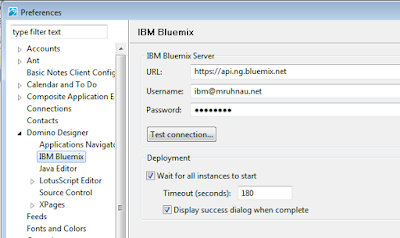
The URL can be gathered from the "Start Coding" page on your Bluemix dashboard.
Click the "Test Connection" Button and see what happens.
Et Voila, I am connected :-)

Now switch to the IBM Bluemix ID previously downloaded. Otherwise your application will break once you deploy modifications signed with another ID file.
To open the downloaded database from the IBM Bluemix starter code into Domino Designer, click on Tools. There should be a new menue item "Import IBM Bluemix Starter Code".
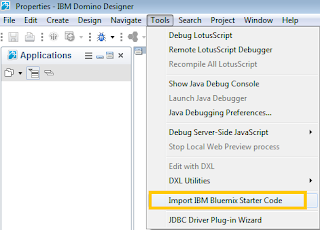
Select the downloaded Starter code zip file and click next
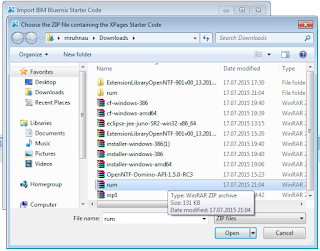
After that you have to specify a Bluemix Deployment directory. This will be used for storing the configuration of this app (manifest fle) as well as to store a deployment copy of your database (more on that t later).

Final step is the selection of the organisation and space in Bluemix (in my quick and dirty setup I didn$t setup the organisation properly).

Click Finish and the Bluemix database will be imported into Domino Designer - and can be modified from there.
So what I want to do now is to implement the first customization to my application. Let's create a new XPage and see if that works on the server...

After saving the page I deploy it to Bluemix using the new Bluemix Toolbar Icon

The deployment took a few minutes - as part of the deployment the application will be updated, stopped and started again. So I assume that most of the time is needed for restarting the app (in case of such a small change at least).

Finally, the deployment was successful.

Now let's see if the new page can be accessed...

Works like a charm :-)
Before you get started with importing the database from Bluemix into Domino Designer, Designer has to be configured to work with Bluemix. In the preferences under "Domino Designer - IBM Bluemix" you can enter the Bluemix Server URL and your username and password (if that option is not available in Domino Designer you first have to install the correct version of the Extension Library).

The URL can be gathered from the "Start Coding" page on your Bluemix dashboard.
Click the "Test Connection" Button and see what happens.
Et Voila, I am connected :-)

Now switch to the IBM Bluemix ID previously downloaded. Otherwise your application will break once you deploy modifications signed with another ID file.
To open the downloaded database from the IBM Bluemix starter code into Domino Designer, click on Tools. There should be a new menue item "Import IBM Bluemix Starter Code".

Select the downloaded Starter code zip file and click next

After that you have to specify a Bluemix Deployment directory. This will be used for storing the configuration of this app (manifest fle) as well as to store a deployment copy of your database (more on that t later).

Final step is the selection of the organisation and space in Bluemix (in my quick and dirty setup I didn$t setup the organisation properly).

Click Finish and the Bluemix database will be imported into Domino Designer - and can be modified from there.
So what I want to do now is to implement the first customization to my application. Let's create a new XPage and see if that works on the server...
After saving the page I deploy it to Bluemix using the new Bluemix Toolbar Icon

The deployment took a few minutes - as part of the deployment the application will be updated, stopped and started again. So I assume that most of the time is needed for restarting the app (in case of such a small change at least).

Finally, the deployment was successful.

Now let's see if the new page can be accessed...
Works like a charm :-)
Subscribe to:
Posts (Atom)