Showing posts with label Domino. Show all posts

Sunday, 31 January 2016

XPages on IBM Bluemix - working with wrong ID file

This is an easy one, but I still think it is worth mentioning all the different findings about a new technology like IBM Bluemix. During my tests with XPages on IBM Bluemix, I once made a little mistake. I forgot to switch to the IBM Bluemix ID file before I started modifying the design of the Bluemix app.


Obviously this is easily possible within Domino Designer. I was also able to deploy my changes to IBM Bluemix, but the new XPage could not be called due to an access issue we know from our good old domino environment too!


Signing the design element and another deployment to Bluemix solved the issue.
Good old Domino security - makes perfectly sense to me :-) It would be really nice to have an option to sign the design during the deployment process though!
(BTW: this is a rather old post which was still unpublished - but I think the deployment process is still the same)

Thursday, 3 December 2015

Image processing using JaxaXT in a Notes / Domino Agent


Today I stumbled across JavaXT. JavaXT is described as
a collection of Java libraries and utilities that provide a number of functions not available in the standard JDK. It is an extension of the Java core, written to simplify Java development.

I needed a library to resize images - from a good old java agent :-/  So far I used the Java Advanced Imaging API  but I had issues resizing some JPEG images. I was not able to find a correlation what caused the issues: And to be honest, my code was not very clean and neat so this was a good opportunity for improvements anyway. 
Using JavaXT I refactored my whole code to very few lines to do some resizing of images and save them in a NotesDatabase. 

This sample processes all Files in a given folder and resizes them to a fixed width of 200 pixel. 

import java.io.File;
import lotus.domino.*;

public class JavaAgent extends AgentBase {

  public void NotesMain() {

    try {
      Session session = getSession();
      AgentContext agentContext = session.getAgentContext();

      File[] files = new File("D:/tmp/pix/").listFiles();
      for (File file : files) {
        if (!file.isDirectory()) {
          String srcFileName = "D:/tmp/pix/" + file.getName();

          javaxt.io.Image image = new javaxt.io.Image(srcFileName);

          String destFileName = "D:/tmp/pix/resize/" + file.getName();
          image.setWidth(200);
          image.saveAs(destFileName);
          
        }
      }

    } catch(Exception e) {
      e.printStackTrace();
    }
  }
}

Job done! In a few lines of code :-)
Besides image processing JavaXT provides a lot more, I can only recommend to check it out. 
If you have suggestions , e. g. for a better approach  I am more than happy about your feedback.

Monday, 20 July 2015

Limitations with multiple instances of XPages applications on IBM Bluemix

I discovered some "limitations" or caveats while I was playing with XPages on IBM Bluemix tonight. I setup two instances of the To Do Boilerplate.

The first thing that annoyed me is that the import of the Bluemix Starter code of the second instance replaced the NSF of my first To Do app. The good news is that Domino Designer asks before the app will be overwritten :-)
If you choose "No", the Starter code won't be imported and you won't loose any data.
One disadvantage for XPages on Bluemix at the moment seems to be that the import always imports into the root folder of your Notes-Data-Directory. This will hopefully be fixed in a future version so that we can import projects into subdirectories. For other Bluemix apps the documentation explains that a developer should create a new subfolder to which he or she can extract the code to. The integration for XPages / Domino is a bit different from that process so this issue seems to be specific for XPages.

Another limitation or issue that came to my attention is that if you setup multiple instances of the same XPages Boilerplate these databases share the same ReplicaID. My two instances both have the ReplicaID 80257E5A:004A751B - and replication of the databases is enabled.


I am wondering if the ReplicaID is bound to the organisation or space or if it is shared across all instances of this Boilerplate. Furthermore I am not sure if this just due to the fact that XPages is still in experimental code. In my opinion this is something IBM should fix for productive use as this can bring lot's of trouble for the developers...(or maybe I am missing something?)

Getting started with XPages on IBM Bluemix - part II

I was able to setup my first XPages Demo Application on IBM Bluemix and prepare everything to start customizing the demo app in Domino Designer. Now I want to get my fingers on the database design

Before you get started with importing the database from Bluemix into Domino Designer, Designer has to be configured to work with Bluemix. In the preferences under "Domino Designer - IBM Bluemix" you can enter the Bluemix Server URL and your username and password (if that option is not available in Domino Designer you first have to install the correct version of the Extension Library).
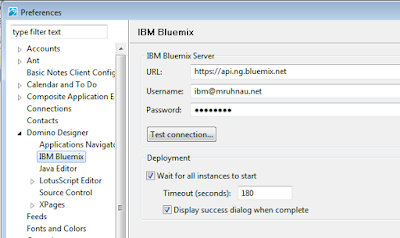
The URL can be gathered from the "Start Coding" page on your Bluemix dashboard.


Click the "Test Connection" Button and see what happens.
Et Voila, I am connected :-)


Now switch to the IBM Bluemix ID previously downloaded. Otherwise your application will break once you deploy modifications signed with another ID file.

To open the downloaded database from the IBM Bluemix starter code into Domino Designer, click on Tools. There should be a new menue item "Import IBM Bluemix Starter Code".
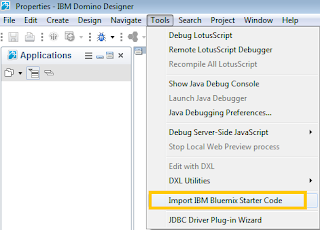


Select the downloaded Starter code zip file and click next
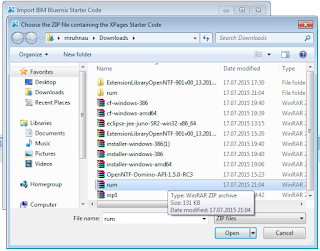


 After that you have to specify a Bluemix Deployment directory. This will be used for storing the configuration of this app (manifest fle) as well as to store a deployment copy of your database (more on that t later).


Final step is the selection of the organisation and space in Bluemix (in my quick and dirty setup I didn$t setup the organisation properly).


Click Finish and the Bluemix database will be imported into Domino Designer - and can be modified from there.

So what I want to do now is to implement the first customization to my application. Let's create a new XPage and see if that works on the server...


After saving the page I deploy it to Bluemix using the new Bluemix Toolbar Icon


The deployment took a few minutes - as part of the deployment the application will be updated, stopped and started again. So I assume that most of the time is needed for restarting the app (in case of such a small change at least).


Finally, the deployment was successful.


Now let's see if the new page can be accessed...


Works like a charm :-)

Wednesday, 18 March 2015

Your help needed: Jump-start guide to IBM Notes for Outlook users

At my workplace we are about to start with migrating a decent amount of users from Exchange/Outlook to Notes 9. Yes, this still happens and I am quite excited about that ;-)

After a user has been migrated we want to provide access to useful information. What we already have is explaining general things like FAQs about using Mail and Calendar, enable Out of Office, Signature etc...

On top of that, I thought it would be helpful if we provided a jump-start guide explaining a few key differences between Notes and Outlook.  I have to admit that in the 18 years of my Notes & Domino carreer I haven't really touched Outlook - neither at work not for personal reasons... In other words: I have no experience with Outlook and therefore I cannot be very helpful in depicting differencs between both systems.

So I would like to ask you to share your experience in what Outlook users struggle most with when switching over to Notes & Domino.
How do users work with Outlook and what adjustment problems do they have when using Notes?
What is missing in Notes and what can we offer as a substitute (public folders...)?


Looking forward to your feedback :-)

Tuesday, 17 March 2015

Apply Java Permissions to Domino Agents at runtime - again ;-)

This post is supposed to be read by developers only. Admins, please move on ;-)

I have an agent which is used to make SFTP file transfers from Domino to our corporate SAP system. It's an interesting project and I am exploring new stuff on a daily basis :-)

One technical issue I had to solve was this:
The agent opens an SFTP session on a remote host. Unfortunately this is forbidden by Java Policies specified in the java.policy file of the JVM of the Domino server.
The error is
java.lang.SecurityException: not allowed to make a socket connection to MYHOST.MYDOMAIN.COM,-1

So I started to dig into java.policy and java.pol files. And to be honest I was not that much pleased about the whole thing. At first I started to grant ANY permissions in the global section of my policy file:


 grant {   
  ...  
  permission java.security.AllPermission;  
  ...  
 };   

This works but it goes a bit over the top for a productive environment... Therefore I started to tweak the policies to only allow one specific application the network operations required to do the job. Honestly, it's been painful... I think I got it more or less configured properly. But given the fact that we run the application in three different environments (DEV/TEST/PROD) on multiple servers I hardly could imagine a proper rollout scenario. I always thought one of the major strengths of domino and NSF was that usually the design and resides in a single database - and the configuration usually resides in the application, a few system databases (+ notes.ini).

There must be an easier way to grant my code the execution rights it needs.
I finally found a solution to grant my code the needed execution rights at runtime of the agent. There is a whole Java package for handling the permissions - and in my particular case I was looking for SocketPermissions. The code to grant a socket permission is pretty straight forward:

 String hostAndPort = "myhost.mydomain.com:22";   
 SocketPermission p = new SocketPermission(hostAndPort,  
       "accept,connect,resolve");  


This will allow my code to make a network connection to the specified host on the specified port. There might be neater solutions to that problem and not every admin would be happy about that. In my opinion it is not very consistent for what you need to grant permissions in policy files (like network connects) but on the other hand file handling can be allowed on the agent security (Allow restricted operations).


Thursday, 5 June 2014

How to overcome Domino Webservice Timeout issues

Many of you might be aware of the restriction described here. I was not, and it caused me and my colleague quite some time to investigate, and fix this. Additionally, it caused us a lot of pain, because this issue increased the pressure on our project. So this might be relevant to some of you too...

So this is the story: We had a very annoying issue with a Domino WebService Consumer which was running in a timeout (almost all the time). As with many other projects the WebService was running fine in our Development environment. In both, our Integration as well as our Production Environment, the WebService always ran into the following error:

Error while reading data from server, Network operation did not complete 
in a reasonable amount of time; please retry

You have experienced this yourself too, don't you? Obviously, the amount of data in our development system was a lot smaller than in the integration and production environment. This is why the issue did not occur in our DEV system. But why the heck does the WebService stop at all??

After quite some research and opening a PMR we were pointed into te right direction:
The default Web Service Timeout is set to 60 seconds. It is a hard coded limitation, IBM seems not to be willing to fix this. To overcome the issue you have to be smarter than me and set the timeout on each WebService consumer individually at runtime. You can do this by calling the setTimeout() function of the WebService and pass the number of miliseconds.

More details can be  found in APAR LO48272: WEBSERIVCE CONSUMER BREAKS THE CONNECTION AFTER 60 SECONDS

Thursday, 16 January 2014

Some thoughts on Source Control Management for XPages development

In my career as a Domino developer I have been playing with various Source Control Managent solutions already. I used TeamStudio Ciao! for many many years and this tool proved to be a life saver in many occasions already. So I owe some drinks to the guys from TeamStudio... (don't tell them!!)

Since IBM started opening Domino Designer in Release 8.5.3 (was it 8.5.2 ???) towards the "standard" SCM systems (Git, SVN, Mercurial) I have been playing with these options a lot. There was quite some pain involved, I lost source code, my repositories lost the link to the NSF/ODP, etc... No pain, no gain! The good news for me: Today I have a working environment which fits my needs :-)
My first steps were with SVN, but I admit that I was not able to get this setup running properly. Additionally, I was not too happy about the centralized approach. That said I started using Mercurial. Finally I ended up using Git, first the implementation in Domino Designer and nowadays using SourceTree. This setup provides me with such a high flexibility with regards to my work-related projects as well with my pet-projects.

The last missing bit so far was a proper SCM system. I have been looking around for a while and playing with various systems. As I am a corporate developer, using a hosted environment was not an option at all. So I was looking for a solution to run my self-hosted SCM server for my code coming from both, work-related projects as well as pet-projects. Finally, I think my journey has ended successfully (or at least I have reached an intermediate stop). I have played with GitLabHQ for a a while now and it looks very promising to me. I got it up and running relatively painless on a local Ubuntu VM. If you are looking for a self-hosted SCM server, I can highly recommend looking into GitLab (it is very focussed on SCM though).
There is a lot of useful information available in- and outside the XPages community. In the upcoming weeks I will describe my environment and approaches and specifically GitLab a little more in detail and hopefully add some more useful bits. So stay tuned!

Wednesday, 8 January 2014

Today I learned how to override session authentication using a web site rule

Did you know that you can override session based authentication based on URL patterns?‎ Yes? Lucky you, I didn`t. I honestly admit it: I am more a developer than an admin ;-). The feature dates back to R7.0.2 so I must have been missed something at that time...

In one of my projects domino provides a web service which can be consumed by a 3rd-party-system. All sites on that server (R8.5) are configured to use  session-based authentication. Since web services cannot authenticate via basic authentication (at least I did not get it working) I  was looking for a way to work around session based authentication. An additional web site involves a lot of effort and patience in this environment as there are quite a few people involved. 

Finally I got the right hint from the developer who consumes the web service. There is a web site rule for that! And I just did not know about it:-o

The setup is quite straight forward. Open an Internet Site document and click on Web Site - Create Rule and select "Override Session Authentication" as type of rule.
You can specify a URL pattern for which domino overrides session based authentication. On the one hand this provides a lot of flexibility‎. On the other hand, the pattern should be chosen with care. Wildcards (*) can be applied too.

So, this is it, my lesson learned today.

Thursday, 28 November 2013

Domino Web Services SSL Error - Keyring file not found

Today I came across a strange behaviour on our Domino (R9.0.1) server.
We have a database with a web service consumer. This Web Service consumer is used by a schedules background agent. The Web Service makes calls to a third party system using https.
The Domino Web Server is configured using Internet Site documents. All https traffic and calls to the server worked perfectly fine from the evry beginning.
Whenever the web service is called, the following error is thrown on the server console:

Error 4746 Web Service XXXXXXXX method XXXXX error 
Error connecting to 'xxxxx.xxxxx' on Keyring file not found

 So there seems to be something wrong with SSL certificates. After some time of trial and error with some more HTTP server restarts I found two helpful ressources on Google:

IBM Technote LO47722: "SSL ERROR: KEYRING FILE ACCESS ERROR" ON WEBSERVICE CONSUMER US ING INTERNET SITE DOCUMENTS

and a thread in the good, old notes.net IBM DeveloperWorks forum:
HTTPS Web Service - SSL Error: Keyring file not found

Both describe the exactly same scenario as used here. The solution is that in both places, the Internet Site as well as the Server document the specified SSL certificate must match. In general I think this makes perfectly sense. However, as soon as you enable "Load Internet configurations from Server\Internet Sites documents"

in the server document, you cannot specify the SSL certificate in the server doc anymore. What I had to do is temporarily turn this setting off, specify the correct SSL certificate and turn it on again. This is the bit that confused me here. The setting in the server document seems to be used for requests issued by the server itself (i. e. web service consumers).

To make a long story short: 
Make sure you have the same SSL certificates specified both in the server doc and the Internet site document.


Monday, 18 November 2013

DOTS: Logging to server console and log.nsf

In one of my current development projects I am developing a DOTS server task(let). One thing that I found very annoying is the logging part of DOTS. With logging, I essentially mean - at least in this post - an output to the server console and / or log.nsf. To achieve this, there are basically two different possibilities for logging in your DOTS projects.


Option 1:  System.out.println
As in other Java projects you can use System.out.println("your message") to print out message to the server console.
Running this little tasklet results in the following output on the server's console:

As you can see, the message is printed to the console. What you cannot see from here is that these messages are not save to log.nsf.

Option 2: logMessage
A way better logging is provided by a specific method logMessage("your message") which is part of the class com.ibm.dots.task.ServerConsole.
While your cord  resides inside the tasklet you can easily use this method instantly without any further declarations:
The output looks like that:


Using this method has several benefits:
  • Messages logged using the logMessage method are saved to log.nsf. 
  • You can see the date and time of the message.
  • In addition, the message indicates that it comes from the DOTS Tasklet "Helloworld".
In my opinion this is the clean way to go for logging from a DOTS tasklet to the console respectively log.nsf.

Moreover, the ServerConsole class provides another very useful method "logException" which accepts a throwable Java Exception which then will be printed to the console. In other words: you can use this method in any catch statemen to handle error logging to the server console / log.nsf.


Saturday, 16 November 2013

iNotes calendar control - a good example to get started

In my previous blog post about the iNotes calendar control, I talked about some issues I was having with the iNotes calendar control which is part of the XPages Extension library. Yes, there are some issues, but to mke a long story short: the control is a great resource. If you want to learn more about this control, I can highly recommend to have look at the latest release of the TeamRoom Template which is deployed to your Lotus IBM Notes client.

If you want to learn more about the iNotes calendar control, check out the calendarView custom control.

BTW: On this control, I experience the same issue with the events as described here.

There is also a TeamRoom project available on OpenNTF (older version). And a demo video by Ed Brill demoing the TeamRoom template. The OpenNTF project description says:

This new TeamRoom OpenNTF 8.5.2 template has been built as a showcase application for the XPages Extension Library.  Approximately 80 different XPages Extension Library controls have been used in the construction of the TeamRoom OpenNTF 8.5.2 template, therefore making it a great learning resource on how to leverage the XPages Extension Library!

In my opinion this hits the nail on the head. This is excatly the reason why everyone learning developing XPages applications (beyond the entry level) should have a look at this template. Additionally this version of the TeamRoom template provides a much better Web UI. So your users might benefit from this template too :-)

Friday, 15 November 2013

XPages iNotes Calendar control - Events oddities

While working in one of our projects with the iNotes calendar control I experienced some oddities with the Events of this control. What I wanted to achieve is that some magic happens when clicking somewhere inside the control - e. g. opening the entry on which the user clicks... Should be pretty straightforward, I was thinking. Stupid me! As usual the devil's in the details.

I started by selecting the control and opening the events view and entered a simle JavaScript in the "onNewEntry" event. The script is supposed to show a message box after  clicking in an empty time slot.
 
In my case the result is that the event just doesn't get fired at all. I tested with FireFox, Google Chrome and even Internet Explorer. After some more testing and playing with the control I noticed an odd behaviour of Domino Designer:
As you can see on the Screenshot above, both events "onNewEntry" and "onOpenEntry" are marked blue which indicates, that there is some code in the event to be executed.  When I opened the "All Properties" view of the control to check the scripts there, I noticed that both events were empty, no script, nada, nil... Switching back to the events view, the scripts were there.


So that got me thinking. Once I entered the same code in an event from the "All Properties" view, the code is executed.

As far as I understand, the "Events" view is kind of buggy for at least this control. Besides the issue described above, I noticed that from the "Events" view I can enter CSJS as well as SSJS and Simple Actions. From the "All Properties" view, only CSJS can be used - and as far as I can see only CSJS is supported. Side note: I am using Domino Designer and Domino Server R 9.0.

 Lesson learned (again): All Properties is where you should do your work!The good news: as soon as you know how to work with this control, it works great :-)

Saturday, 14 September 2013

Domino OSGi Tasklet Services - some useful links

I am currently working on a DOTS project. Since I have started this project I benefited a lot from various community resources out there. First of all, thank you very much to the originating authors for sharing these resources with all of us! I was thinking that starting a link collection for DOTS might be a good idea for others who want dive deeper in this topic...

So this is a list of some valuable resources I used :


Feel free to add more links in the comments section :)